
How to Film a Baseball Swing for Analysis (Angle, Distance, and Phone Settings)

June 18, 2026 · 6 min read
The short answer
How you film a swing matters more than which app you point at it. Get four things right and almost any modern phone gives an honest read: film side-on (not from behind), stand back about 8-10 ft so the whole body fits, hold the phone level with the hitter and dead steady, and shoot in good light with slow-motion on if your phone has it. A clean clip from the phone in your pocket beats a sloppy clip from a fancy one.
Here is the thing nobody selling you an app wants to lead with: the app is the easy part. The hard part, the part that decides whether you get a useful read or a shrug, happens before you ever hit analyze. It is how you film. A great app fed a bad clip cannot tell you much, because it is reading the same blurry, half-cropped, shot-from-behind video you are squinting at. Feed any decent tool a clean side-on clip and it suddenly looks a lot smarter. So let us get the filming right first.
Why how you film beats which app you pick
Swing analysis, whether a human coach or a phone app does it, comes down to reading the body through the swing: posture, balance, where the head goes, and timing from load to contact. All of that lives in the angle. Film from behind the hitter and you have hidden the turn, the part that matters most. Film up at a steep angle and you have warped the spine and the hips. Film in the dark or with a handheld wobble and you have blurred the one frame, contact, you most wanted to see clearly.
None of that is the app's fault, and no amount of clever software fully fixes a clip shot from the wrong spot. That is genuinely good news for your wallet. You do not need to chase the newest phone or the priciest app. You need to stand in the right place and hold the phone still.
The setup that gets a clean read
Five things to get right, in order of how much they matter:
- Angle: side-on, not from behind. Stand off to the side so the camera sees the full turn. A right-handed batter films best from the first-base side, a lefty from the third-base side. This is the single biggest lever, so if you only fix one thing, fix this.
- Height: level with the hitter. Set the phone around belt to chest height so you are not shooting up at the swing or down on it. A level camera keeps the spine and hips looking like they actually do.
- Distance: the whole body in frame. Back up so head, hands, bat, and feet all fit with a little room to spare through the entire swing. Around 8-10 ft is a common starting point, not a hard rule. If the bat clips out at follow-through, take a step back.
- Steady beats everything handheld. Prop the phone on a bag, a fence rail, or a cheap stand. A still frame reads cleaner than the best handheld hold, every time.
- Light, with the sun at the camera's back. Good light and the sun behind you (not behind the hitter) keeps the ball and the body bright and crisp instead of washed out or in silhouette.
One more setting worth flipping on: slow motion, if your phone has it. A swing is fast, and at normal speed the moment of contact can smear into a single blurry frame. Slow motion spreads that instant across more frames so you, or the app, can actually see it. Most modern phones can shoot slow motion, so this is usually a free toggle, not a gadget you buy. Film in landscape, too, so the full body fits the wide way.
Film it in five steps
- Prop or mount the phone to the side of the hitter, on their open side so the camera sees the turn.
- Set it level with the hitter, roughly belt to chest height, in landscape.
- Back up until the whole body fits the frame with a little margin, around 8-10 ft to start.
- Check your light: bright, with the sun behind the camera, and turn on slow-motion mode if you have it.
- Take a few clean swings off a tee or soft toss, then watch one back before you film a whole bucket.
That last step saves you the most grief. One test swing watched back tells you if the bat is clipping out of frame or the light is fighting you, before you have filmed forty cuts you have to throw away. If you are also chasing an exit-velo number off the same clip, we walk through that side in detail in our guide on how to measure exit velocity at home.
2D vs 3D vs LiDAR, in plain English
Once you start shopping apps you will trip over three terms: 2D, 3D, and LiDAR. Here is the plain-English version, with the honesty built in.
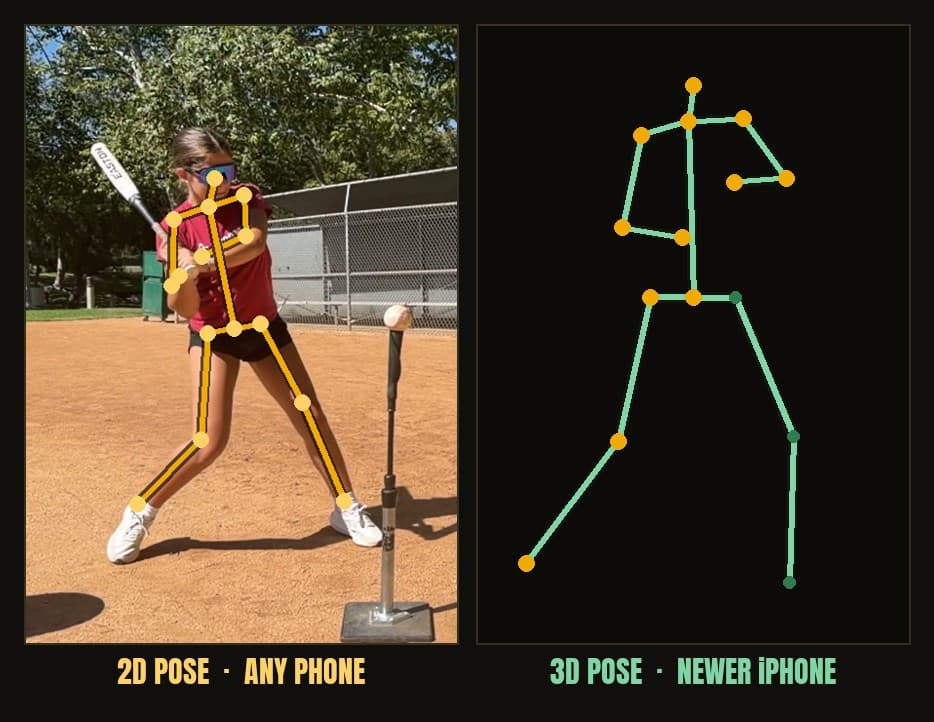
| What it is | What it gives you | What it needs | Honest catch |
|---|---|---|---|
| 2D body pose | A flat skeleton tracking joints, enough for posture, balance, head movement, and timing | Essentially any modern phone | It is flat, so it cannot judge front-to-back depth on its own |
| 3D body pose (single camera) | That skeleton plus an estimated front-to-back depth | A newer iPhone to do the processing | From one camera the depth is an estimate, not a measurement |
| LiDAR scene depth | A real depth read of the scene, useful for scale | A Pro-model iPhone | A nice-to-have, not required; most hitters never need it |
The takeaway most parents need: 2D body pose is plenty for a youth hitter, and it runs on the phone you already own. 3D adds estimated depth and looks impressive, but a single phone camera is guessing at the dimension it cannot directly see, so treat that depth as a best estimate rather than a measurement. True, trustworthy 3D capture happens in a biomechanics lab with multiple cameras locked together, and that is built for recruits and pros, not a kid chasing a backyard home run. LiDAR can help an app understand scale, but it lives on Pro phones and you do not need it to get a useful read. We lay all of this out on the swing analysis page if you want to see how the read actually works.
A clean clip on a normal phone wins
Put it all together and the rule is simple. A steady, side-on, well-lit clip from an ordinary phone will out-read a shaky, backlit, shot-from-behind clip filmed on the fanciest Pro model on the market. The phone is rarely the bottleneck. The angle, the light, and the wobble are. Fix those, and any decent analyzer has something honest to work with.
If you want the wider rundown of which apps and tools fit which kind of hitter, we wrote a whole honest comparison in our best free baseball swing analysis app guide. And when you are ready to point a clean clip at a free read, you can analyze a swing free in your browser or sign up for the beta. Prop the phone, get side-on, take a cut, and watch it back.
Frequently asked questions
What angle should I film a baseball swing from?
Film side-on, not from behind. Stand off to the side so the camera sees the hitter's full turn from load to follow-through. A right-handed batter films best from the first-base side, a lefty from the third-base side. Set the phone level with the hitter, roughly belt to chest height, so the swing is not shot up or down at an angle that warps what you see.
How far away should the phone be when filming a swing?
Far enough that the whole body fits in the frame with a little room to spare, head to feet, through the entire swing. Around 8 to 10 ft is a common starting point, not a hard rule. If the bat or hands clip out of frame at contact or follow-through, back up a step. If the hitter is a tiny figure in the distance, move in.
What phone settings are best for filming a swing?
Use good light with the sun behind the camera, keep the phone steady on a stand or prop, and turn on slow-motion mode if your phone has it. Slow motion helps freeze a fast swing so contact does not blur into one smeared frame. Most modern phones can shoot slow motion, so you usually do not need to buy anything. Film in landscape so the full body fits.
What is the difference between 2D and 3D swing analysis?
2D analysis lays a flat skeleton on the swing from a single camera and tracks joints in two dimensions, which is plenty for reading posture, balance, head movement, and timing on almost any phone. 3D analysis adds an estimated front-to-back depth to that skeleton, usually on a newer iPhone. The honest catch: from a single camera, that 3D depth is an estimate, not a measurement. True 3D capture happens in a lab with multiple cameras.
Do I need an iPhone Pro with LiDAR to analyze a swing?
No. LiDAR is a scene-depth sensor on Pro-model iPhones and it is a nice-to-have for scale, not a requirement. 2D body-pose runs on essentially any modern phone, and that flat skeleton already reads the body well. A clean, steady, side-on clip from a normal phone beats a sloppy clip from a fancy one every time.
Get a free swing read
SwingDino reads the exit velo off the tee and charts the trend, free on iPhone during the beta.
Sign up for the beta