
Best Free Baseball Swing Analysis App in 2026 (Honest Youth Guide)

Published June 16, 2026 · Updated June 18, 2026 · 7 min read
The short answer
Most "free" swing apps are really a trial, or tied to a sensor you have to buy. SwingDino actually gives a youth hitter a free swing read from the phone: exit velo plus a plain body read, made to be fun. I founded it, so weigh that accordingly, but the goal is simple, help your kid improve and have fun, however they get there.
Start here, because it matters more than any feature chart: if you are reading this, you have already done the hard part. A parent searching for swing analysis is a parent trying to help their kid get better. A player searching for it is a kid who wants to get better on their own. That intent is the whole ballgame. A swing improves when someone actually wants it to, and you are already there.
Here is the catch every parent knows and no kid will admit. Sometimes the kid does not think they need to work on anything, or the work starts to feel like a chore, and a chore is the quickest way to kill a swing before it ever grows. Closing that gap is the real job, and it is why SwingDino leans so hard on fun. You cannot really escape it in our app, on purpose. A home-run game, a dino that levels up, a number that climbs, none of that is decoration. It is how a kid takes another forty swings without being nagged into it.
And if you are the player reading this, the same thing works in your favor. Wanting to study your swing is great, right up until it starts to feel like homework and you drift off it. The dino layer keeps it light and keeps you coming back, more like a buddy in the cage than an app that grades you. Either way, parent or player, you are in the right frame of mind. So let us talk about the free apps that actually do this.
One honest heads-up before we dig in. When an app calls itself free, the free part usually has a gate. Somebody built it, and most people do not give software away without a plan to make money, so the genuinely useful stuff often sits behind a subscription or a sensor you have to buy. That is not a knock, it is just the landscape, and knowing it up front saves you an hour lost in the app store. SwingDino is one of the options on this list too, so we will be blunt about where it is the right call and where it is the wrong one.
The free landscape at a glance
Here are the free, phone-only ways to read a swing, the ones that need nothing but the phone already in your bag. The paid sensor and facility rows at the bottom are context, not the focus, so you can see where the free apps fit and where the spend begins.
| Option | What it measures | What "free" really means | Best for |
|---|---|---|---|
| SwingDino (free phone app) | Exit velo off a tee, body-pose swing read, consistency, PRs | Genuinely free read on a phone; small optional Plus tier for extras | Casual to developing youth hitters and non-technical parents who want fun plus a few honest numbers |
| b4-app (phone app) | Exit velo plus a firehose of camera stats (attack angle, bat path, contact point) | Small free tier (reportedly around 30 swings a month), then paid | Serious players and coaches who want maximum camera stats and accept cloud video |
| Draw-line / markup apps (OnForm) | Nothing automatic; slow-mo video you mark up and compare yourself | Free to low-cost, but the analysis is on you | A parent or coach who already knows what to look for |
| Bat sensors (Blast, Diamond Kinetics) | Bat speed, attack angle, on-plane (no live exit velo) | Not free: hardware up front plus a yearly subscription, per bat | Older or serious players studying bat mechanics (context, covered on /compare) |
| Facility rigs (HitTrax, Rapsodo, Trackman) | Lab-accurate exit velo, launch angle, distance off live contact | Not free: pay per cage session, or business-priced to own | Measure days, showcases, and recruiting prep (context, covered on /compare) |
One pattern is worth tattooing on the dugout fence. The free phone apps cost nothing and need only a phone you already own, and they each answer a slightly different question. The paid tiers below them answer narrower questions for real money. No single box does it all, and for a youth hitter you almost never need to start with the paid ones.
Free phone-camera apps: the youth starting point
This is the home base for a casual youth hitter and a parent who does not want a second job learning software. Camera apps read the BODY using on-device pose tracking, and some also read exit velo by timing the ball off the bat. They split into two genres: apps that read the swing for you automatically, and apps that hand you a slow-mo clip and a pen and let you do the analyzing. Here is the honest tour of the free options, and what "free" means for each.
SwingDino
SwingDino is the automatic, fun-first option. It reads exit velo off a tee straight from the phone camera, lays a body-pose skeleton on the swing, and hands the read to a coach character named Sage, who gives a plain-language take plus one drill to work on. The PR cards and the Dinger Derby home-run game give a kid something to chase, and the app tracks progress over time so you can actually see the line move. It runs on the phone already in your bag, there is nothing to strap on a seven-year-old, and when it cannot get a clean look (too dark, too far, bad angle) it says so instead of inventing a number. On the free question: the core swing read is genuinely free, with a small optional Plus tier ($2.99/mo or $25/yr, one plan for the whole family) for extras. You can dig into the exit velo read, the reasoning behind our plain body-read approach, or just analyze a swing free in your browser right now, with no app to download.
On privacy: the swing is measured on the phone and deleted on the spot. We keep only the numbers. Nothing about your kid is uploaded or sold. (That is the sentence to paste into the team chat when someone asks where the video goes.)
Pros
- Genuinely free read on a phone you already own, nothing to strap on the kid
- Reads exit velo plus a plain body-pose swing read with one drill
- Fun-first: Dinger Derby, PR cards, and a consistency trend a kid will chase
- Honest when it cannot get a clean look, and your kid's video is never uploaded
Cons
- Not lab-grade; it is a trend tracker, not a facility radar
- Cannot honestly recover true 3D bat path or an exact barrel-contact point
- iPhone-first today, with a small optional Plus tier for extras
b4-app
b4-app is the closest thing to a direct peer: an iPhone-camera batting app with no gadget to strap on a kid, and genuinely serious feature depth. Where it differs is philosophy. It is built as a "personal batting lab" that floods you with camera-derived stats, attack angle, bat path, a contact point, off a single phone camera, and it keeps your kid's swing video in the cloud. On the free question: there is a small free tier, reportedly around 30 swings a month to try before you pay, then it moves to a subscription. For a committed older player or a coach who wants the maximum number of readings and will wade through them, that depth is a real strength. For a casual youth family, it is a lot of stats a flat camera cannot honestly measure, plus video you did not necessarily want stored. Fair where it wins, honest where it does not fit.
Pros
- iPhone-only too, no bat hardware, like us
- Deep, serious feature set for players and coaches who want maximum stats
- A small free tier (reportedly around 30 swings a month) to try before you pay
Cons
- Prints camera-derived stats a flat camera cannot honestly measure to the decimal
- Keeps your kid's swing video in the cloud
- Less fun and more to wade through for a young hitter
Draw-line and video-markup apps
Then there is the markup genre, the apps that do not analyze anything on their own. You film in slow motion, then draw lines and angles on the frame and compare two clips side by side. A quick honest note on this category: the two names parents still search for, Coach's Eye and Hudl Technique, are both gone now. Coach's Eye was discontinued, reported around 2022, and Hudl Technique users were reportedly moved to OnForm, so do not chase a download that no longer exists. OnForm is the current tool that carries this style of slow-mo, draw-on-the-frame review, and it is free to low-cost to use. These are useful in the right hands, but the analysis is on you, the parent or coach. If you already know what a good swing looks like, they are a sharp tool. If you are hoping the app will tell you, they will not.
How a phone actually reads a swing
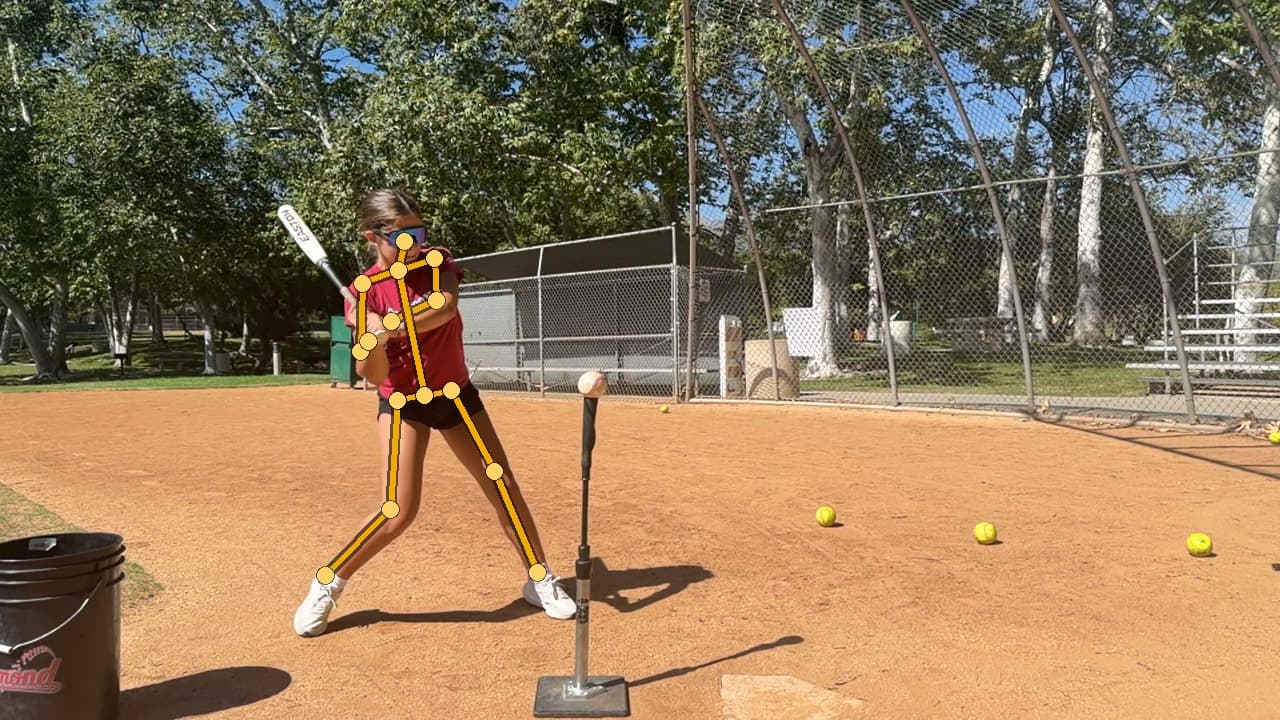
"Reading the body" is not magic, and it helps to see what it means. A phone breaks the cut into phases, load, stride, contact, follow-through, and lays a pose skeleton on each frame. From those joints it tracks posture, balance, head movement, and timing across the whole swing.
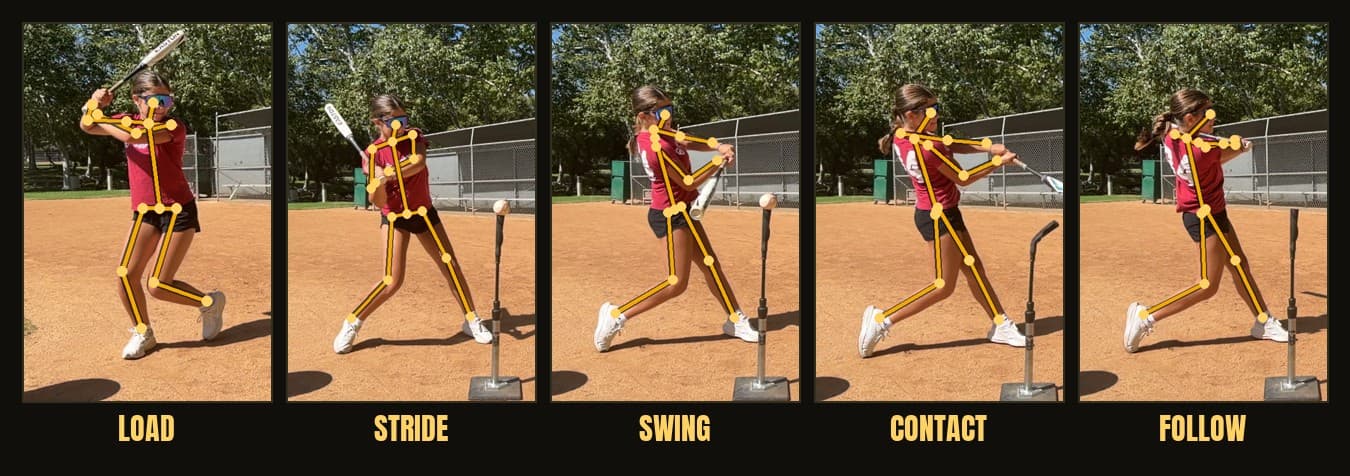
That is genuinely useful, and it is honest about its edges. A flat camera reads posture, balance, head movement, and timing well. It cannot honestly recover the true 3D path of the barrel or the exact point of contact on it. So Sage sticks to what the body shows and hands back a plain read plus one drill, rather than a dashboard of numbers a camera never earned. We lay all of this out on the swing analysis page, and we are blunt about it being a trend tracker, not a radar gun. A phone exit-velo number should not be taken on faith, so treat it as close rather than exact, and always attach the conditions: off a tee, in good light. The read wobbles most in low light, at a too-far or behind-the-plate angle, and on a chopped or fouled-off contact, so a good app should say it could not get a clean look rather than print a number anyway.
What about sensors, facilities, and coaches?
Free phone apps are the heart of this guide, but they are not the only way to look at a swing. Here is the short version of everything past the phone, with one line each and a place to go deeper.
- Bat sensors and the full price matrix. A bat-knob sensor (Blast Motion, Diamond Kinetics) reads bat mechanics a camera cannot, for real hardware money on every bat. See the side-by-side on our compare page.
- Exit velo at a facility or with radar. A facility rig (HitTrax, Rapsodo, Trackman) or a handheld radar gives you one trusted reference number off live contact. We walk through the options in how to measure exit velocity at home.
- How accurate a phone number really is. If you want the honest, run-it-yourself radar test and the conditions that wreck a read, that all lives on our accuracy page.
- Filming, and the 2D vs 3D vs LiDAR question. Your phone matters far less than how you film, and the 2D versus 3D pose question is simpler than it sounds. We break both down in how to film a baseball swing for analysis.
- A real human eye. Sending footage to a coach through an app like OnForm or CoachNow is often the best value-per-dollar for actually FIXING a swing. It pairs perfectly with a free numbers tool, with the app supplying the data and the coach supplying the judgment.
A parent does not need to spend a dollar to know a kid is improving. A rising exit-velo number and a swing that looks more balanced on the phone tell you that for free.
So which free app is best for you?
Find your row, then go.
- Casual or developing youth hitter plus a non-technical parent. SwingDino. It reads exit velo off the phone, gives a plain body-pose read through Sage, has the Dinger Derby game and PR cards a kid will chase, tracks progress, runs on the phone already in the bag, and straps nothing on the kid.
- High-school cage rat who films on a phone. Still a free phone-camera app, honestly. If what you want is a free exit-velo number and a shareable PR card off your own phone in the garage, plus a consistency trend you can wave at a coach come tryouts, you do not need to buy a sensor for that. Check the high-school end of the average exit velocity by age chart to see where your number sits.
- Player or coach who wants the maximum free stats. b4-app, with eyes open. The free tier is small (reportedly around 30 swings a month), the feature depth is real, and you accept that some camera-derived numbers are estimates and your video lives in the cloud.
- Parent or coach who already knows what to look for. A free draw-line app like OnForm. You film in slow motion and mark up the frame yourself. The tool is sharp; the read is on you.
When a free phone app is the wrong pick for you
Honesty cuts both ways, so here is when to skip the free apps entirely. If you need a single calibrated number a scout will treat as official, go to a facility radar, not a phone. If your whole goal is bat mechanics like attack angle and on-plane efficiency, buy a sensor; a camera cannot honestly measure those, and the full price matrix is on compare. If you are on Android today, SwingDino is iPhone-first, so you are not our hitter yet. And if your six-year-old just wants to whack a ball off a tee and giggle, you do not need any app at all, the fun is the point, and the number is only ever a souvenir of a swing she already loved taking.
For everyday use and fun with a youth hitter, on a phone you already own, SwingDino is a genuinely good place to start, and it is honest about its ceiling. A softball family can start the same way and check the exit velo by age ranges while they are at it. Point the phone, take a cut, and watch the line move. Sign up for the beta.
Frequently asked questions
What is the best free baseball swing analysis app for a youth player?
For a casual or developing young hitter and a non-technical parent, a free phone-camera app like SwingDino is a strong overall pick. It reads exit velo off a tee straight from the phone, gives a plain swing read from a coach character named Sage, has a home-run game and progress tracking, and straps nothing on the kid. b4-app is the deeper option if you want maximum camera stats, and a draw-line app like OnForm fits a parent who already knows what to look for. Full disclosure: this guide is published by SwingDino, so we kept the competitor facts fair and labeled where others win.
Are these swing apps actually free, or is free just a trial?
It depends on the app, and this trips up a lot of parents. SwingDino hands a youth hitter a real swing read from the phone for free, with a small optional Plus tier for extras. b4-app reportedly offers a small free tier of around 30 swings a month, then it is paid. Draw-line and markup apps like OnForm are free to low-cost, but they analyze nothing on their own, so the work is on you. The rule of thumb: when an app calls itself free, check whether the genuinely useful part sits behind a subscription or a sensor you have to buy first.
What is the best free app to measure exit velocity?
For free on a phone, a camera app that times the ball off the bat, like SwingDino, gives you a usable exit velo off a tee in good light. Treat it as a trend tracker, not a calibrated radar, and always attach the conditions to the number, off a tee in good light. If you want one trusted reference reading, that comes from a handheld radar or a facility rig, which we cover separately.
Do I need to pay for a swing app to help a youth hitter?
No. For the basics a young hitter benefits from most, a free phone-camera app covers steady at-home tracking: exit velo off a tee, a plain body read, and a consistency trend you can actually watch climb. Paid tools and sensors answer narrower or more advanced questions, so add them later only if the player specifically wants to dig deeper.
Is a free phone app good enough, or do I need a bat sensor?
For most youth families the free phone is the right starting point. A camera app reads the body (posture, balance, head movement, timing) plus exit velo, and it is free and fun. A bat sensor reads the bat (speed, attack angle, on-plane), which a camera cannot honestly measure, but it costs money and straps onto every bat. Start free on the phone, and add a sensor later only if the player is specifically chasing mechanics.
Get a free swing read
SwingDino reads the exit velo off the tee and charts the trend, free on iPhone during the beta.
Sign up for the beta